About Tally Counter & Habit Tracker
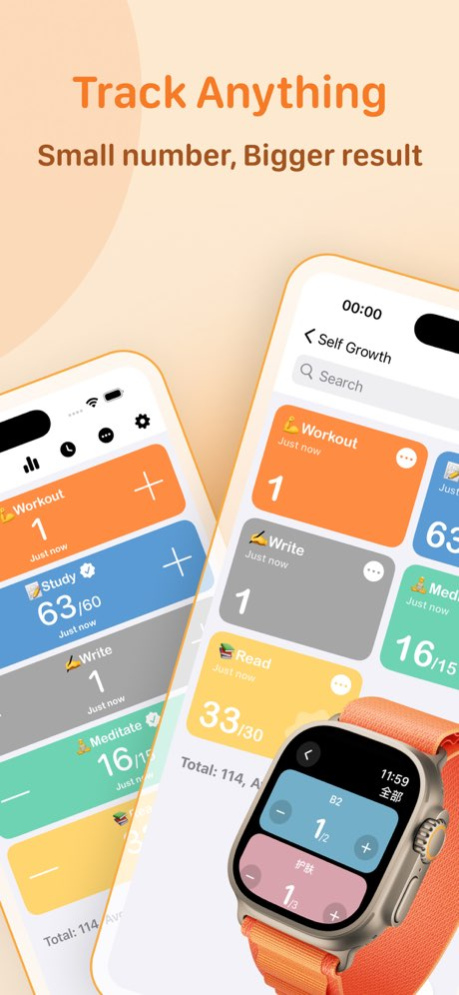
Tally is a super convenient digital counting app, designed to help you track and record everything in your life, big or small. Whether you're forming daily habits, logging important events, or managing item quantities,...
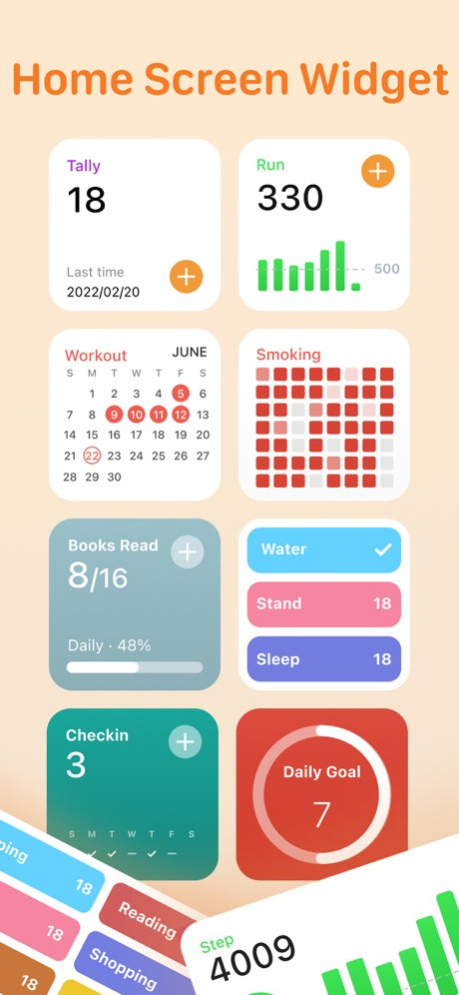
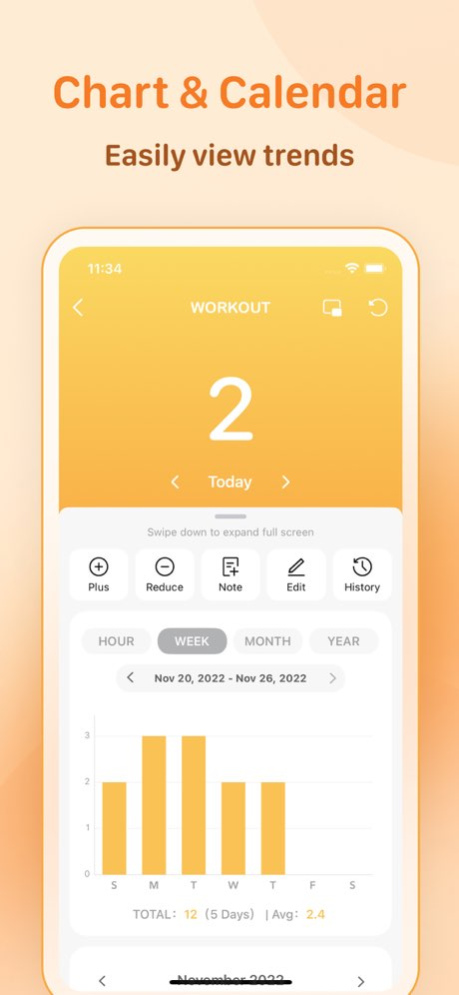
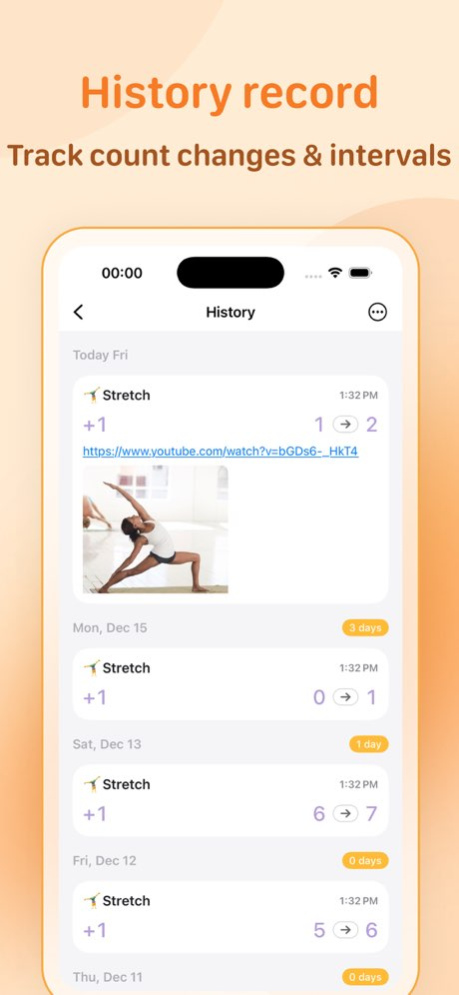
Tally is a super convenient digital counting app, designed to help you track and record everything in your life, big or small. Whether you're forming daily habits, logging important events, or managing item quantities, this app can handle it all with ease. With features like notifications, repeat cycles, charts, and memos, you can track nearly every number in your daily life effortlessly. # Use Cases Whether you want to log the number of cigarettes you smoke, track how much coffee you drink each week, or monitor your daily water intake, Tally makes it easy. It’s also perfect for inventory management, foot traffic counting, or even managing classroom tasks and point systems, giving you an effortless way to keep track of all your data. # Rich Data Insights Track your events over various timeframes-daily, weekly, monthly, or yearly. You can easily view the frequency of events, the number of days since they last occurred, and the intervals in your history. With a wealth of charts, calendar views, and heat maps, your data is clear and easy to understand. # Key Features ## Quick Recording, Convenient Tracking With interactive widgets, Shortcut App, URL Scheme, Action Notifications, and Picture-in-Picture counting, tracking is a breeze. Plus, Tally supports Apple Watch, so you can log directly from your watch. ## Custom Cycles, Track Your Key Totals Support for daily, weekly, monthly, and yearly cycles, along with custom cycles. You can also set the number of completions needed for each cycle, making it easy to track your goals. ## Up to 15 Different Widgets, Tailored to Your Needs ## Group Management Manage your own or others' tasks, track various life events, form habits, and even manage counters for classrooms or inventory. Tally is versatile and not limited to habit tracking. It supports grouped statistics and various visual charts, making it easy to view data across different groups. ## Comprehensive Visual Reports Track statistics over daily, weekly, monthly, yearly, or all timeframes, with a rich selection of visual charts-bar charts, tables, calendars, line graphs, pie charts, and heat maps. ## No Limit on Number of Entries The more you add, the more you'll discover just how convenient Tally is, making management a breeze. ## Real-Time iCloud Sync ## Data Security We always prioritize your data. Not only do we offer iCloud sync, but also local backups to ensure your data is safe. You can also set a privacy lock on the app to protect your information. --- Privacy Statement: We do not collect any user information, except for data related to bug reports and user experience improvements collected via Google. If you're enjoying the app, we'd be incredibly grateful if you could leave a positive review. Your feedback means a lot to us! If you have any questions or suggestions, don't hesitate to reach out at iapp605+tally@gmail.com.
Previous Versions
Here you can find the changelog of Tally Counter & Habit Tracker since it was posted on our website on 2016-11-02 23:52:48.
The latest version is 4.5.0 and it was updated on 2026-10-07 08:59:56. See below the changes in each version.
Tally Counter & Habit Tracker version 4.5.0
Updated At: 2026-10-06
Changes: Version History - New: Today’s To-Do Home Screen widget
- New: Large Calendar widget and Extra Large Calendar widget for iOS 27
- Improved loading speed and scrolling performance on Statistics and Details screens
- Fixed other known issues for a better overall experience 4.5.0 Sep 25 - Added a haptic feedback setting for Home Screen widgets. Go to Settings → Counter Actions → Haptics and turn off Home Screen Widgets.
- Fixed a possible crash when reordering counters on the Home screen.
- Fixed an issue where history data could remain after deleting a counter or clearing its records.
- Fixed a possible crash when viewing records in an unavailable group.
- Fixed known issues and improved the overall experience. 4.4.5 Sep 21 - Fixed known issues to improve your experience 4.4.3 Sep 21 - Added: Daily statistics can now be viewed as a pie chart
- Other known issue fixes 4.4.2 Sep 15 - Improved: Tags can now be grouped by counter and added or removed in bulk
- Fixed: Tag counts in the menu did not update after deleting a counter
- Other refinements and known issue fixes 4.4.1 Sep 14 - New: Customize what appears on the right side of menu groups
- New: Previous Period Review now shows both completed and incomplete goals
- Improved: Numeric counters such as weight now show the day's latest value in weekly views, stats, and widgets
- Improved: Smoother transitions for the floating timer window
- Fixed: Unpinning a counter on Home restores it to its original position
- Other refinements and known issue fixes 4.4.0 Sep 11 - New: Keep timers running in a floating window while checking in or counting
- New: Tag support in the List widget
- New: Check-in and undo actions in the Weekly Check-in widget
- New: Batch editing for tags
- New: Option to show only incomplete counters in the Weekly Check-in widget
- Improved: Status display across months in the Home weekly view
- Other refinements and known issue fixes 4.3.0 Sep 8 - New: Group menus are now shown in the list widget
- New: Long-press to manage tags on the Menu page
- New: Home check-in styles now support negative status values
- Improved: Calendar mode experience in History
- Improved: Counter type selection and descriptions
- Other detail improvements and known issue fixes 4.2.0 Sep 2 - Added support for preserving collapsed group states on the Home screen
- Improved entry display in the History calendar view
- Improved Y-axis scaling and value formatting in trend charts
- Improved photo thumbnail loading speed when adding records
- Fixed other known issues 4.1.0 Aug 30 - Added full support for iOS 26 and iPadOS 26, with improvements to navigation bars, menus, safe areas, and scrolling
- Improved the Home screen’s weekly view, Today button, style selection, and long-press actions
- Improved the history calendar and timeline, with support for editing entries by tapping them
- Added annual calendar details for monthly periods in Statistics, with linked selection between pie charts and cards
- Improved trend charts and group switching, and fixed flickering values, misaligned scales, and clipping
- Improved Home Screen widgets
- Fixed issues with spaces in names used for batch creation and URL schemes
- Fixed issues with photo selection, data recovery, and iPad layouts
- Other known issues have been fixed 4.0.0 Aug 26 - Improved Home Screen widgets
- Fixed other known issues 3.28.4 Aug 7 - Improved weekly view calculations so counters with goals continue to use overall progress.
- Improved the trend chart: the Y-axis maximum now uses the highest daily value in the history for easier comparisons across periods.
- Removed data point markers from trend lines.
- Fixed user-reported issues when editing history and entering dates manually.
- Fixed notifications not working when first created.
- Fixed other known issues. 3.28.3 Jul 27 - Added sorting for items in History Calendar to make records easier to find
- Improved History Calendar loading and scrolling
- Improved Statistics screen loading and navigation performance
- Other known issues fixed 3.28.2 Jul 19 - Improved the experience in History calendar mode
- Other known issue fixes 3.28.1 Jul 15 - Added grouped display for tag-filtered counters on the Home screen
- Improved zooming in History calendar mode, with support for shrinking down to a single-row counter view
- Other known issue fixes 3.28.0 Jul 6 - Fixed an issue in Weekly View (Open it from the Home screen by tapping More and selecting Weekly View)
- Fixed other known issues 3.27.1 Jul 4 - Added a weekly view for quickly updating missed check-ins in batches and reviewing yesterday's check-in status (Open it from the Home screen by tapping More in the navigation bar and selecting Weekly View)
- Fixed other issues and improved the overall experience 3.27.0 Jul 1 - Added a Shortcuts action to get the last recorded time
- Fixed an issue where items on the Home screen could not be reordered by dragging
- Fixed other issues and improved the overall experience 3.26.0 Jun 23 - Added an option to group All by counter, adjustable in More > Home Options
- Fixed other issues and improved the overall experience 3.25.1 Jun 21 - Added a new minimalist home screen widget with undo support
- Fixed other known issues 3.25.0 Jun 16 - Fixed a display issue with the weekly calendar widget in standard mode
- Fixed crashes that could occur in some cases
- Improved the experience for statistics, calendar, and home screen widgets
- Updated copy and localized content for some features
- Fixed other known issues 3.24.4 Jun 13 - Fixed a display issue with the weekly calendar widget in standard mode 3.24.3 May 16 - Home screen widgets now support tinted and clear modes
- Home screen widgets now use custom widgets only. Add them in Settings - Home Widget
- Fixed known issues and improved the overall experience 3.24.2 May 15 - Bug fixes and experience improvements 3.24.1 May 9 - Watch now supports timer tracking
- Fixed some known issues 3.24.0 May 5
Tally Counter & Habit Tracker version 4.5.0
Updated At: 2026-09-26
Changes: Version History - New: Today’s To-Do Home Screen widget
- New: Large Calendar widget and Extra Large Calendar widget for iOS 27
- Improved loading speed and scrolling performance on Statistics and Details screens
- Fixed other known issues for a better overall experience 4.5.0 23h ago - Added a haptic feedback setting for Home Screen widgets. Go to Settings → Counter Actions → Haptics and turn off Home Screen Widgets.
- Fixed a possible crash when reordering counters on the Home screen.
- Fixed an issue where history data could remain after deleting a counter or clearing its records.
- Fixed a possible crash when viewing records in an unavailable group.
- Fixed known issues and improved the overall experience. 4.4.5 4d ago - Fixed known issues to improve your experience 4.4.3 5d ago - Added: Daily statistics can now be viewed as a pie chart
- Other known issue fixes 4.4.2 Sep 15 - Improved: Tags can now be grouped by counter and added or removed in bulk
- Fixed: Tag counts in the menu did not update after deleting a counter
- Other refinements and known issue fixes 4.4.1 Sep 14 - New: Customize what appears on the right side of menu groups
- New: Previous Period Review now shows both completed and incomplete goals
- Improved: Numeric counters such as weight now show the day's latest value in weekly views, stats, and widgets
- Improved: Smoother transitions for the floating timer window
- Fixed: Unpinning a counter on Home restores it to its original position
- Other refinements and known issue fixes 4.4.0 Sep 11 - New: Keep timers running in a floating window while checking in or counting
- New: Tag support in the List widget
- New: Check-in and undo actions in the Weekly Check-in widget
- New: Batch editing for tags
- New: Option to show only incomplete counters in the Weekly Check-in widget
- Improved: Status display across months in the Home weekly view
- Other refinements and known issue fixes 4.3.0 Sep 8 - New: Group menus are now shown in the list widget
- New: Long-press to manage tags on the Menu page
- New: Home check-in styles now support negative status values
- Improved: Calendar mode experience in History
- Improved: Counter type selection and descriptions
- Other detail improvements and known issue fixes 4.2.0 Sep 2 - Added support for preserving collapsed group states on the Home screen
- Improved entry display in the History calendar view
- Improved Y-axis scaling and value formatting in trend charts
- Improved photo thumbnail loading speed when adding records
- Fixed other known issues 4.1.0 Aug 30 - Added full support for iOS 26 and iPadOS 26, with improvements to navigation bars, menus, safe areas, and scrolling
- Improved the Home screen’s weekly view, Today button, style selection, and long-press actions
- Improved the history calendar and timeline, with support for editing entries by tapping them
- Added annual calendar details for monthly periods in Statistics, with linked selection between pie charts and cards
- Improved trend charts and group switching, and fixed flickering values, misaligned scales, and clipping
- Improved Home Screen widgets
- Fixed issues with spaces in names used for batch creation and URL schemes
- Fixed issues with photo selection, data recovery, and iPad layouts
- Other known issues have been fixed 4.0.0 Aug 26 - Improved Home Screen widgets
- Fixed other known issues 3.28.4 Aug 7 - Improved weekly view calculations so counters with goals continue to use overall progress.
- Improved the trend chart: the Y-axis maximum now uses the highest daily value in the history for easier comparisons across periods.
- Removed data point markers from trend lines.
- Fixed user-reported issues when editing history and entering dates manually.
- Fixed notifications not working when first created.
- Fixed other known issues. 3.28.3 Jul 27 - Added sorting for items in History Calendar to make records easier to find
- Improved History Calendar loading and scrolling
- Improved Statistics screen loading and navigation performance
- Other known issues fixed 3.28.2 Jul 19 - Improved the experience in History calendar mode
- Other known issue fixes 3.28.1 Jul 15 - Added grouped display for tag-filtered counters on the Home screen
- Improved zooming in History calendar mode, with support for shrinking down to a single-row counter view
- Other known issue fixes 3.28.0 Jul 6 - Fixed an issue in Weekly View (Open it from the Home screen by tapping More and selecting Weekly View)
- Fixed other known issues 3.27.1 Jul 4 - Added a weekly view for quickly updating missed check-ins in batches and reviewing yesterday's check-in status (Open it from the Home screen by tapping More in the navigation bar and selecting Weekly View)
- Fixed other issues and improved the overall experience 3.27.0 Jul 1 - Added a Shortcuts action to get the last recorded time
- Fixed an issue where items on the Home screen could not be reordered by dragging
- Fixed other issues and improved the overall experience 3.26.0 Jun 23 - Added an option to group All by counter, adjustable in More > Home Options
- Fixed other issues and improved the overall experience 3.25.1 Jun 21 - Added a new minimalist home screen widget with undo support
- Fixed other known issues 3.25.0 Jun 16 - Fixed a display issue with the weekly calendar widget in standard mode
- Fixed crashes that could occur in some cases
- Improved the experience for statistics, calendar, and home screen widgets
- Updated copy and localized content for some features
- Fixed other known issues 3.24.4 Jun 13 - Fixed a display issue with the weekly calendar widget in standard mode 3.24.3 May 16 - Home screen widgets now support tinted and clear modes
- Home screen widgets now use custom widgets only. Add them in Settings - Home Widget
- Fixed known issues and improved the overall experience 3.24.2 May 15 - Bug fixes and experience improvements 3.24.1 May 9 - Watch now supports timer tracking
- Fixed some known issues 3.24.0 May 5
Tally Counter & Habit Tracker version 4.4.2
Updated At: 2026-09-19
Changes: Version History - Added: Daily statistics can now be viewed as a pie chart
- Other known issue fixes 4.4.2 3d ago - Improved: Tags can now be grouped by counter and added or removed in bulk
- Fixed: Tag counts in the menu did not update after deleting a counter
- Other refinements and known issue fixes 4.4.1 4d ago - New: Customize what appears on the right side of menu groups
- New: Previous Period Review now shows both completed and incomplete goals
- Improved: Numeric counters such as weight now show the day's latest value in weekly views, stats, and widgets
- Improved: Smoother transitions for the floating timer window
- Fixed: Unpinning a counter on Home restores it to its original position
- Other refinements and known issue fixes 4.4.0 Sep 11 - New: Keep timers running in a floating window while checking in or counting
- New: Tag support in the List widget
- New: Check-in and undo actions in the Weekly Check-in widget
- New: Batch editing for tags
- New: Option to show only incomplete counters in the Weekly Check-in widget
- Improved: Status display across months in the Home weekly view
- Other refinements and known issue fixes 4.3.0 Sep 8 - New: Group menus are now shown in the list widget
- New: Long-press to manage tags on the Menu page
- New: Home check-in styles now support negative status values
- Improved: Calendar mode experience in History
- Improved: Counter type selection and descriptions
- Other detail improvements and known issue fixes 4.2.0 Sep 2 - Added support for preserving collapsed group states on the Home screen
- Improved entry display in the History calendar view
- Improved Y-axis scaling and value formatting in trend charts
- Improved photo thumbnail loading speed when adding records
- Fixed other known issues 4.1.0 Aug 30 - Added full support for iOS 26 and iPadOS 26, with improvements to navigation bars, menus, safe areas, and scrolling
- Improved the Home screen’s weekly view, Today button, style selection, and long-press actions
- Improved the history calendar and timeline, with support for editing entries by tapping them
- Added annual calendar details for monthly periods in Statistics, with linked selection between pie charts and cards
- Improved trend charts and group switching, and fixed flickering values, misaligned scales, and clipping
- Improved Home Screen widgets
- Fixed issues with spaces in names used for batch creation and URL schemes
- Fixed issues with photo selection, data recovery, and iPad layouts
- Other known issues have been fixed 4.0.0 Aug 26 - Improved Home Screen widgets
- Fixed other known issues 3.28.4 Aug 7 - Improved weekly view calculations so counters with goals continue to use overall progress.
- Improved the trend chart: the Y-axis maximum now uses the highest daily value in the history for easier comparisons across periods.
- Removed data point markers from trend lines.
- Fixed user-reported issues when editing history and entering dates manually.
- Fixed notifications not working when first created.
- Fixed other known issues. 3.28.3 Jul 27 - Added sorting for items in History Calendar to make records easier to find
- Improved History Calendar loading and scrolling
- Improved Statistics screen loading and navigation performance
- Other known issues fixed 3.28.2 Jul 19 - Improved the experience in History calendar mode
- Other known issue fixes 3.28.1 Jul 15 - Added grouped display for tag-filtered counters on the Home screen
- Improved zooming in History calendar mode, with support for shrinking down to a single-row counter view
- Other known issue fixes 3.28.0 Jul 6 - Fixed an issue in Weekly View (Open it from the Home screen by tapping More and selecting Weekly View)
- Fixed other known issues 3.27.1 Jul 4 - Added a weekly view for quickly updating missed check-ins in batches and reviewing yesterday's check-in status (Open it from the Home screen by tapping More in the navigation bar and selecting Weekly View)
- Fixed other issues and improved the overall experience 3.27.0 Jul 1 - Added a Shortcuts action to get the last recorded time
- Fixed an issue where items on the Home screen could not be reordered by dragging
- Fixed other issues and improved the overall experience 3.26.0 Jun 23 - Added an option to group All by counter, adjustable in More > Home Options
- Fixed other issues and improved the overall experience 3.25.1 Jun 21 - Added a new minimalist home screen widget with undo support
- Fixed other known issues 3.25.0 Jun 16 - Fixed a display issue with the weekly calendar widget in standard mode
- Fixed crashes that could occur in some cases
- Improved the experience for statistics, calendar, and home screen widgets
- Updated copy and localized content for some features
- Fixed other known issues 3.24.4 Jun 13 - Fixed a display issue with the weekly calendar widget in standard mode 3.24.3 May 16 - Home screen widgets now support tinted and clear modes
- Home screen widgets now use custom widgets only. Add them in Settings - Home Widget
- Fixed known issues and improved the overall experience 3.24.2 May 15 - Bug fixes and experience improvements 3.24.1 May 9 - Watch now supports timer tracking
- Fixed some known issues 3.24.0 May 5 - Fixed some known issues 3.23.3 Apr 30 - Improved the search page display
- Other known issues fixed 3.23.2 Apr 23 - Added progress value display on the Home screen
- Restored Siri Shortcuts. After creating a counter, open the edit page again and add it using the Siri button at the bottom
- Other known issues fixed 3.23.1 Apr 20
Tally Counter & Habit Tracker version 4.4.0
Updated At: 2026-09-12
Changes: Version History - New: Customize what appears on the right side of menu groups
- New: Previous Period Review now shows both completed and incomplete goals
- Improved: Numeric counters such as weight now show the day's latest value in weekly views, stats, and widgets
- Improved: Smoother transitions for the floating timer window
- Fixed: Unpinning a counter on Home restores it to its original position
- Other refinements and known issue fixes 4.4.0 17h ago - New: Keep timers running in a floating window while checking in or counting
- New: Tag support in the List widget
- New: Check-in and undo actions in the Weekly Check-in widget
- New: Batch editing for tags
- New: Option to show only incomplete counters in the Weekly Check-in widget
- Improved: Status display across months in the Home weekly view
- Other refinements and known issue fixes 4.3.0 3d ago - New: Group menus are now shown in the list widget
- New: Long-press to manage tags on the Menu page
- New: Home check-in styles now support negative status values
- Improved: Calendar mode experience in History
- Improved: Counter type selection and descriptions
- Other detail improvements and known issue fixes 4.2.0 Sep 2 - Added support for preserving collapsed group states on the Home screen
- Improved entry display in the History calendar view
- Improved Y-axis scaling and value formatting in trend charts
- Improved photo thumbnail loading speed when adding records
- Fixed other known issues 4.1.0 Aug 30 - Added full support for iOS 26 and iPadOS 26, with improvements to navigation bars, menus, safe areas, and scrolling
- Improved the Home screen’s weekly view, Today button, style selection, and long-press actions
- Improved the history calendar and timeline, with support for editing entries by tapping them
- Added annual calendar details for monthly periods in Statistics, with linked selection between pie charts and cards
- Improved trend charts and group switching, and fixed flickering values, misaligned scales, and clipping
- Improved Home Screen widgets
- Fixed issues with spaces in names used for batch creation and URL schemes
- Fixed issues with photo selection, data recovery, and iPad layouts
- Other known issues have been fixed 4.0.0 Aug 26 - Improved Home Screen widgets
- Fixed other known issues 3.28.4 Aug 7 - Improved weekly view calculations so counters with goals continue to use overall progress.
- Improved the trend chart: the Y-axis maximum now uses the highest daily value in the history for easier comparisons across periods.
- Removed data point markers from trend lines.
- Fixed user-reported issues when editing history and entering dates manually.
- Fixed notifications not working when first created.
- Fixed other known issues. 3.28.3 Jul 27 - Added sorting for items in History Calendar to make records easier to find
- Improved History Calendar loading and scrolling
- Improved Statistics screen loading and navigation performance
- Other known issues fixed 3.28.2 Jul 19 - Improved the experience in History calendar mode
- Other known issue fixes 3.28.1 Jul 15 - Added grouped display for tag-filtered counters on the Home screen
- Improved zooming in History calendar mode, with support for shrinking down to a single-row counter view
- Other known issue fixes 3.28.0 Jul 6 - Fixed an issue in Weekly View (Open it from the Home screen by tapping More and selecting Weekly View)
- Fixed other known issues 3.27.1 Jul 4 - Added a weekly view for quickly updating missed check-ins in batches and reviewing yesterday's check-in status (Open it from the Home screen by tapping More in the navigation bar and selecting Weekly View)
- Fixed other issues and improved the overall experience 3.27.0 Jul 1 - Added a Shortcuts action to get the last recorded time
- Fixed an issue where items on the Home screen could not be reordered by dragging
- Fixed other issues and improved the overall experience 3.26.0 Jun 23 - Added an option to group All by counter, adjustable in More > Home Options
- Fixed other issues and improved the overall experience 3.25.1 Jun 21 - Added a new minimalist home screen widget with undo support
- Fixed other known issues 3.25.0 Jun 16 - Fixed a display issue with the weekly calendar widget in standard mode
- Fixed crashes that could occur in some cases
- Improved the experience for statistics, calendar, and home screen widgets
- Updated copy and localized content for some features
- Fixed other known issues 3.24.4 Jun 13 - Fixed a display issue with the weekly calendar widget in standard mode 3.24.3 May 16 - Home screen widgets now support tinted and clear modes
- Home screen widgets now use custom widgets only. Add them in Settings - Home Widget
- Fixed known issues and improved the overall experience 3.24.2 May 15 - Bug fixes and experience improvements 3.24.1 May 9 - Watch now supports timer tracking
- Fixed some known issues 3.24.0 May 5 - Fixed some known issues 3.23.3 Apr 30 - Improved the search page display
- Other known issues fixed 3.23.2 Apr 23 - Added progress value display on the Home screen
- Restored Siri Shortcuts. After creating a counter, open the edit page again and add it using the Siri button at the bottom
- Other known issues fixed 3.23.1 Apr 20 - Added timer support with Live Activities, Lock Screen widgets, and Home Screen widgets for timer display and quick access
- Improved the Home cards, calendar, and heatmap views, and fixed several refresh and display issues
- Other known issues fixed 3.23.0 Apr 17 - Calendar widget now shows the counter's current value by default. To display the monthly total instead, customize it in widget settings
- Bug fixes
If your widget fails to load or display properly, try re-adding it or restarting your device. For questions or feedback: iapp605+tally@gmail.com 3.22.1 Apr 3
Tally Counter & Habit Tracker version 4.2.0
Updated At: 2026-09-05
Changes: Version History - New: Group menus are now shown in the list widget
- New: Long-press to manage tags on the Menu page
- New: Home check-in styles now support negative status values
- Improved: Calendar mode experience in History
- Improved: Counter type selection and descriptions
- Other detail improvements and known issue fixes 4.2.0 2d ago - Added support for preserving collapsed group states on the Home screen
- Improved entry display in the History calendar view
- Improved Y-axis scaling and value formatting in trend charts
- Improved photo thumbnail loading speed when adding records
- Fixed other known issues 4.1.0 5d ago - Added full support for iOS 26 and iPadOS 26, with improvements to navigation bars, menus, safe areas, and scrolling
- Improved the Home screen’s weekly view, Today button, style selection, and long-press actions
- Improved the history calendar and timeline, with support for editing entries by tapping them
- Added annual calendar details for monthly periods in Statistics, with linked selection between pie charts and cards
- Improved trend charts and group switching, and fixed flickering values, misaligned scales, and clipping
- Improved Home Screen widgets
- Fixed issues with spaces in names used for batch creation and URL schemes
- Fixed issues with photo selection, data recovery, and iPad layouts
- Other known issues have been fixed 4.0.0 Aug 26 - Improved Home Screen widgets
- Fixed other known issues 3.28.4 Aug 7 - Improved weekly view calculations so counters with goals continue to use overall progress.
- Improved the trend chart: the Y-axis maximum now uses the highest daily value in the history for easier comparisons across periods.
- Removed data point markers from trend lines.
- Fixed user-reported issues when editing history and entering dates manually.
- Fixed notifications not working when first created.
- Fixed other known issues. 3.28.3 Jul 27 - Added sorting for items in History Calendar to make records easier to find
- Improved History Calendar loading and scrolling
- Improved Statistics screen loading and navigation performance
- Other known issues fixed 3.28.2 Jul 19 - Improved the experience in History calendar mode
- Other known issue fixes 3.28.1 Jul 15 - Added grouped display for tag-filtered counters on the Home screen
- Improved zooming in History calendar mode, with support for shrinking down to a single-row counter view
- Other known issue fixes 3.28.0 Jul 6 - Fixed an issue in Weekly View (Open it from the Home screen by tapping More and selecting Weekly View)
- Fixed other known issues 3.27.1 Jul 4 - Added a weekly view for quickly updating missed check-ins in batches and reviewing yesterday's check-in status (Open it from the Home screen by tapping More in the navigation bar and selecting Weekly View)
- Fixed other issues and improved the overall experience 3.27.0 Jul 1 - Added a Shortcuts action to get the last recorded time
- Fixed an issue where items on the Home screen could not be reordered by dragging
- Fixed other issues and improved the overall experience 3.26.0 Jun 23 - Added an option to group All by counter, adjustable in More > Home Options
- Fixed other issues and improved the overall experience 3.25.1 Jun 21 - Added a new minimalist home screen widget with undo support
- Fixed other known issues 3.25.0 Jun 16 - Fixed a display issue with the weekly calendar widget in standard mode
- Fixed crashes that could occur in some cases
- Improved the experience for statistics, calendar, and home screen widgets
- Updated copy and localized content for some features
- Fixed other known issues 3.24.4 Jun 13 - Fixed a display issue with the weekly calendar widget in standard mode 3.24.3 May 16 - Home screen widgets now support tinted and clear modes
- Home screen widgets now use custom widgets only. Add them in Settings - Home Widget
- Fixed known issues and improved the overall experience 3.24.2 May 15 - Bug fixes and experience improvements 3.24.1 May 9 - Watch now supports timer tracking
- Fixed some known issues 3.24.0 May 5 - Fixed some known issues 3.23.3 Apr 30 - Improved the search page display
- Other known issues fixed 3.23.2 Apr 23 - Added progress value display on the Home screen
- Restored Siri Shortcuts. After creating a counter, open the edit page again and add it using the Siri button at the bottom
- Other known issues fixed 3.23.1 Apr 20 - Added timer support with Live Activities, Lock Screen widgets, and Home Screen widgets for timer display and quick access
- Improved the Home cards, calendar, and heatmap views, and fixed several refresh and display issues
- Other known issues fixed 3.23.0 Apr 17 - Calendar widget now shows the counter's current value by default. To display the monthly total instead, customize it in widget settings
- Bug fixes
If your widget fails to load or display properly, try re-adding it or restarting your device. For questions or feedback: iapp605+tally@gmail.com 3.22.1 Apr 3 - New tag feature: add tags to counters, filter by tag, and view tag history
- Other experience improvements
- Bug fixes
For any questions or suggestions, feel free to reach out at iapp605+tally@gmail.com 3.22.0 Apr 1 - When selecting "All" group on the home page, counters are now displayed by group for easier management
- Home page sorting now supports drag-and-drop between groups, with completed groups sorted by your chosen order
- Improved data loading performance on the statistics page
- Bug fixes
For any questions or suggestions, feel free to reach out at iapp605+tally@gmail.com 3.21.1 Mar 25
Tally Counter & Habit Tracker version 4.0.0
Updated At: 2026-08-27
Changes: Version History - Added full support for iOS 26 and iPadOS 26, with improvements to navigation bars, menus, safe areas, and scrolling
- Improved the Home screen’s weekly view, Today button, style selection, and long-press actions
- Improved the history calendar and timeline, with support for editing entries by tapping them
- Added annual calendar details for monthly periods in Statistics, with linked selection between pie charts and cards
- Improved trend charts and group switching, and fixed flickering values, misaligned scales, and clipping
- Improved Home Screen widgets
- Fixed issues with spaces in names used for batch creation and URL schemes
- Fixed issues with photo selection, data recovery, and iPad layouts
- Other known issues have been fixed 4.0.0 1d ago - Improved Home Screen widgets
- Fixed other known issues 3.28.4 Aug 7 - Improved weekly view calculations so counters with goals continue to use overall progress.
- Improved the trend chart: the Y-axis maximum now uses the highest daily value in the history for easier comparisons across periods.
- Removed data point markers from trend lines.
- Fixed user-reported issues when editing history and entering dates manually.
- Fixed notifications not working when first created.
- Fixed other known issues. 3.28.3 Jul 27 - Added sorting for items in History Calendar to make records easier to find
- Improved History Calendar loading and scrolling
- Improved Statistics screen loading and navigation performance
- Other known issues fixed 3.28.2 Jul 19 - Improved the experience in History calendar mode
- Other known issue fixes 3.28.1 Jul 15 - Added grouped display for tag-filtered counters on the Home screen
- Improved zooming in History calendar mode, with support for shrinking down to a single-row counter view
- Other known issue fixes 3.28.0 Jul 6 - Fixed an issue in Weekly View (Open it from the Home screen by tapping More and selecting Weekly View)
- Fixed other known issues 3.27.1 Jul 4 - Added a weekly view for quickly updating missed check-ins in batches and reviewing yesterday's check-in status (Open it from the Home screen by tapping More in the navigation bar and selecting Weekly View)
- Fixed other issues and improved the overall experience 3.27.0 Jul 1 - Added a Shortcuts action to get the last recorded time
- Fixed an issue where items on the Home screen could not be reordered by dragging
- Fixed other issues and improved the overall experience 3.26.0 Jun 23 - Added an option to group All by counter, adjustable in More > Home Options
- Fixed other issues and improved the overall experience 3.25.1 Jun 21 - Added a new minimalist home screen widget with undo support
- Fixed other known issues 3.25.0 Jun 16 - Fixed a display issue with the weekly calendar widget in standard mode
- Fixed crashes that could occur in some cases
- Improved the experience for statistics, calendar, and home screen widgets
- Updated copy and localized content for some features
- Fixed other known issues 3.24.4 Jun 13 - Fixed a display issue with the weekly calendar widget in standard mode 3.24.3 May 16 - Home screen widgets now support tinted and clear modes
- Home screen widgets now use custom widgets only. Add them in Settings - Home Widget
- Fixed known issues and improved the overall experience 3.24.2 May 15 - Bug fixes and experience improvements 3.24.1 May 9 - Watch now supports timer tracking
- Fixed some known issues 3.24.0 May 5 - Fixed some known issues 3.23.3 Apr 30 - Improved the search page display
- Other known issues fixed 3.23.2 Apr 23 - Added progress value display on the Home screen
- Restored Siri Shortcuts. After creating a counter, open the edit page again and add it using the Siri button at the bottom
- Other known issues fixed 3.23.1 Apr 20 - Added timer support with Live Activities, Lock Screen widgets, and Home Screen widgets for timer display and quick access
- Improved the Home cards, calendar, and heatmap views, and fixed several refresh and display issues
- Other known issues fixed 3.23.0 Apr 17 - Calendar widget now shows the counter's current value by default. To display the monthly total instead, customize it in widget settings
- Bug fixes
If your widget fails to load or display properly, try re-adding it or restarting your device. For questions or feedback: iapp605+tally@gmail.com 3.22.1 Apr 3 - New tag feature: add tags to counters, filter by tag, and view tag history
- Other experience improvements
- Bug fixes
For any questions or suggestions, feel free to reach out at iapp605+tally@gmail.com 3.22.0 Apr 1 - When selecting "All" group on the home page, counters are now displayed by group for easier management
- Home page sorting now supports drag-and-drop between groups, with completed groups sorted by your chosen order
- Improved data loading performance on the statistics page
- Bug fixes
For any questions or suggestions, feel free to reach out at iapp605+tally@gmail.com 3.21.1 Mar 25 What's New:
- Added home screen styles (tap the More button on the home navigation bar, then select Home Style)
- Calendar-style widget now shows the monthly total count
- Improved data loading performance on the Statistics page
- Bug fixes and performance improvements
If you experience any widget issues, please re-add the widget or restart your device. For questions or feedback: iapp605+tally@gmail.com 3.21.0 Mar 23 What's new:
- Faster loading and improved UI for the Statistics screen
- UI refinements and bug fixes
If your home screen widget isn't working properly, try re-adding it or restarting your device. For any questions or feedback, reach out to iapp605+tally@gmail.com 3.20.1 Mar 20
Tally Counter & Habit Tracker version 3.28.4
Updated At: 2026-08-08
Changes: Version History - Improved Home Screen widgets
- Fixed other known issues 3.28.4 16h ago - Improved weekly view calculations so counters with goals continue to use overall progress.
- Improved the trend chart: the Y-axis maximum now uses the highest daily value in the history for easier comparisons across periods.
- Removed data point markers from trend lines.
- Fixed user-reported issues when editing history and entering dates manually.
- Fixed notifications not working when first created.
- Fixed other known issues. 3.28.3 Jul 27 - Added sorting for items in History Calendar to make records easier to find
- Improved History Calendar loading and scrolling
- Improved Statistics screen loading and navigation performance
- Other known issues fixed 3.28.2 Jul 19 - Improved the experience in History calendar mode
- Other known issue fixes 3.28.1 Jul 15 - Added grouped display for tag-filtered counters on the Home screen
- Improved zooming in History calendar mode, with support for shrinking down to a single-row counter view
- Other known issue fixes 3.28.0 Jul 6 - Fixed an issue in Weekly View (Open it from the Home screen by tapping More and selecting Weekly View)
- Fixed other known issues 3.27.1 Jul 4 - Added a weekly view for quickly updating missed check-ins in batches and reviewing yesterday's check-in status (Open it from the Home screen by tapping More in the navigation bar and selecting Weekly View)
- Fixed other issues and improved the overall experience 3.27.0 Jul 1 - Added a Shortcuts action to get the last recorded time
- Fixed an issue where items on the Home screen could not be reordered by dragging
- Fixed other issues and improved the overall experience 3.26.0 Jun 23 - Added an option to group All by counter, adjustable in More > Home Options
- Fixed other issues and improved the overall experience 3.25.1 Jun 21 - Added a new minimalist home screen widget with undo support
- Fixed other known issues 3.25.0 Jun 16 - Fixed a display issue with the weekly calendar widget in standard mode
- Fixed crashes that could occur in some cases
- Improved the experience for statistics, calendar, and home screen widgets
- Updated copy and localized content for some features
- Fixed other known issues 3.24.4 Jun 13 - Fixed a display issue with the weekly calendar widget in standard mode 3.24.3 May 16 - Home screen widgets now support tinted and clear modes
- Home screen widgets now use custom widgets only. Add them in Settings - Home Widget
- Fixed known issues and improved the overall experience 3.24.2 May 15 - Bug fixes and experience improvements 3.24.1 May 9 - Watch now supports timer tracking
- Fixed some known issues 3.24.0 May 5 - Fixed some known issues 3.23.3 Apr 30 - Improved the search page display
- Other known issues fixed 3.23.2 Apr 23 - Added progress value display on the Home screen
- Restored Siri Shortcuts. After creating a counter, open the edit page again and add it using the Siri button at the bottom
- Other known issues fixed 3.23.1 Apr 20 - Added timer support with Live Activities, Lock Screen widgets, and Home Screen widgets for timer display and quick access
- Improved the Home cards, calendar, and heatmap views, and fixed several refresh and display issues
- Other known issues fixed 3.23.0 Apr 17 - Calendar widget now shows the counter's current value by default. To display the monthly total instead, customize it in widget settings
- Bug fixes
If your widget fails to load or display properly, try re-adding it or restarting your device. For questions or feedback: iapp605+tally@gmail.com 3.22.1 Apr 3 - New tag feature: add tags to counters, filter by tag, and view tag history
- Other experience improvements
- Bug fixes
For any questions or suggestions, feel free to reach out at iapp605+tally@gmail.com 3.22.0 Apr 1 - When selecting "All" group on the home page, counters are now displayed by group for easier management
- Home page sorting now supports drag-and-drop between groups, with completed groups sorted by your chosen order
- Improved data loading performance on the statistics page
- Bug fixes
For any questions or suggestions, feel free to reach out at iapp605+tally@gmail.com 3.21.1 Mar 25 What's New:
- Added home screen styles (tap the More button on the home navigation bar, then select Home Style)
- Calendar-style widget now shows the monthly total count
- Improved data loading performance on the Statistics page
- Bug fixes and performance improvements
If you experience any widget issues, please re-add the widget or restart your device. For questions or feedback: iapp605+tally@gmail.com 3.21.0 Mar 23 What's new:
- Faster loading and improved UI for the Statistics screen
- UI refinements and bug fixes
If your home screen widget isn't working properly, try re-adding it or restarting your device. For any questions or feedback, reach out to iapp605+tally@gmail.com 3.20.1 Mar 20 - New yearly heatmap — view your entire year's check-in data at a glance
- Bug fixes
If home screen widgets are not working properly, please re-add the widget or restart your device. For questions or feedback, contact iapp605+tally@gmail.com 3.20.0 Mar 13
Tally Counter & Habit Tracker version 3.28.2
Updated At: 2026-07-23
Changes: Version History - Added sorting for items in History Calendar to make records easier to find
- Improved History Calendar loading and scrolling
- Improved Statistics screen loading and navigation performance
- Other known issues fixed 3.28.2 3d ago - Improved the experience in History calendar mode
- Other known issue fixes 3.28.1 Jul 15 - Added grouped display for tag-filtered counters on the Home screen
- Improved zooming in History calendar mode, with support for shrinking down to a single-row counter view
- Other known issue fixes 3.28.0 Jul 6 - Fixed an issue in Weekly View (Open it from the Home screen by tapping More and selecting Weekly View)
- Fixed other known issues 3.27.1 Jul 4 - Added a weekly view for quickly updating missed check-ins in batches and reviewing yesterday's check-in status (Open it from the Home screen by tapping More in the navigation bar and selecting Weekly View)
- Fixed other issues and improved the overall experience 3.27.0 Jul 1 - Added a Shortcuts action to get the last recorded time
- Fixed an issue where items on the Home screen could not be reordered by dragging
- Fixed other issues and improved the overall experience 3.26.0 Jun 23 - Added an option to group All by counter, adjustable in More > Home Options
- Fixed other issues and improved the overall experience 3.25.1 Jun 21 - Added a new minimalist home screen widget with undo support
- Fixed other known issues 3.25.0 Jun 16 - Fixed a display issue with the weekly calendar widget in standard mode
- Fixed crashes that could occur in some cases
- Improved the experience for statistics, calendar, and home screen widgets
- Updated copy and localized content for some features
- Fixed other known issues 3.24.4 Jun 13 - Fixed a display issue with the weekly calendar widget in standard mode 3.24.3 May 16 - Home screen widgets now support tinted and clear modes
- Home screen widgets now use custom widgets only. Add them in Settings - Home Widget
- Fixed known issues and improved the overall experience 3.24.2 May 15 - Bug fixes and experience improvements 3.24.1 May 9 - Watch now supports timer tracking
- Fixed some known issues 3.24.0 May 5 - Fixed some known issues 3.23.3 Apr 30 - Improved the search page display
- Other known issues fixed 3.23.2 Apr 23 - Added progress value display on the Home screen
- Restored Siri Shortcuts. After creating a counter, open the edit page again and add it using the Siri button at the bottom
- Other known issues fixed 3.23.1 Apr 20 - Added timer support with Live Activities, Lock Screen widgets, and Home Screen widgets for timer display and quick access
- Improved the Home cards, calendar, and heatmap views, and fixed several refresh and display issues
- Other known issues fixed 3.23.0 Apr 17 - Calendar widget now shows the counter's current value by default. To display the monthly total instead, customize it in widget settings
- Bug fixes
If your widget fails to load or display properly, try re-adding it or restarting your device. For questions or feedback: iapp605+tally@gmail.com 3.22.1 Apr 3 - New tag feature: add tags to counters, filter by tag, and view tag history
- Other experience improvements
- Bug fixes
For any questions or suggestions, feel free to reach out at iapp605+tally@gmail.com 3.22.0 Apr 1 - When selecting "All" group on the home page, counters are now displayed by group for easier management
- Home page sorting now supports drag-and-drop between groups, with completed groups sorted by your chosen order
- Improved data loading performance on the statistics page
- Bug fixes
For any questions or suggestions, feel free to reach out at iapp605+tally@gmail.com 3.21.1 Mar 25 What's New:
- Added home screen styles (tap the More button on the home navigation bar, then select Home Style)
- Calendar-style widget now shows the monthly total count
- Improved data loading performance on the Statistics page
- Bug fixes and performance improvements
If you experience any widget issues, please re-add the widget or restart your device. For questions or feedback: iapp605+tally@gmail.com 3.21.0 Mar 23 What's new:
- Faster loading and improved UI for the Statistics screen
- UI refinements and bug fixes
If your home screen widget isn't working properly, try re-adding it or restarting your device. For any questions or feedback, reach out to iapp605+tally@gmail.com 3.20.1 Mar 20 - New yearly heatmap — view your entire year's check-in data at a glance
- Bug fixes
If home screen widgets are not working properly, please re-add the widget or restart your device. For questions or feedback, contact iapp605+tally@gmail.com 3.20.0 Mar 13 - Redesigned history page: list mode now supports timeline view, calendar mode supports vertical scrolling with pinch-to-zoom for event rows, and hidden count mode can display streak records
- History records now support batch deletion
- Numeric type counters can now be converted to count type
- Fixed an issue where the custom input page could not appear on certain iPad models
- Improved iPad detail page layout
- Other bug fixes and improvements
If widgets display incorrectly, please re-add them or restart your device. For questions or feedback: iapp605+tally@gmail.com 3.19.7 Mar 9 - Improved interaction experience on some pages
- Fixed several known issues
If your home screen widget is not working properly, please try re-adding the widget or restarting your phone. For any questions or suggestions, feel free to reach out at iapp605+tally@gmail.com 3.19.6 Mar 4
Tally Counter & Habit Tracker version 3.27.0
Updated At: 2026-07-01
Changes: Version History - Added a weekly view for quickly updating missed check-ins in batches and reviewing yesterday's check-in status (Open it from the Home screen by tapping More in the navigation bar and selecting Weekly View)
- Fixed other issues and improved the overall experience 3.27.0 5h ago - Added a Shortcuts action to get the last recorded time
- Fixed an issue where items on the Home screen could not be reordered by dragging
- Fixed other issues and improved the overall experience 3.26.0 Jun 23 - Added an option to group All by counter, adjustable in More > Home Options
- Fixed other issues and improved the overall experience 3.25.1 Jun 21 - Added a new minimalist home screen widget with undo support
- Fixed other known issues 3.25.0 Jun 16 - Fixed a display issue with the weekly calendar widget in standard mode
- Fixed crashes that could occur in some cases
- Improved the experience for statistics, calendar, and home screen widgets
- Updated copy and localized content for some features
- Fixed other known issues 3.24.4 Jun 13 - Fixed a display issue with the weekly calendar widget in standard mode 3.24.3 May 16 - Home screen widgets now support tinted and clear modes
- Home screen widgets now use custom widgets only. Add them in Settings - Home Widget
- Fixed known issues and improved the overall experience 3.24.2 May 15 - Bug fixes and experience improvements 3.24.1 May 9 - Watch now supports timer tracking
- Fixed some known issues 3.24.0 May 5 - Fixed some known issues 3.23.3 Apr 30 - Improved the search page display
- Other known issues fixed 3.23.2 Apr 23 - Added progress value display on the Home screen
- Restored Siri Shortcuts. After creating a counter, open the edit page again and add it using the Siri button at the bottom
- Other known issues fixed 3.23.1 Apr 20 - Added timer support with Live Activities, Lock Screen widgets, and Home Screen widgets for timer display and quick access
- Improved the Home cards, calendar, and heatmap views, and fixed several refresh and display issues
- Other known issues fixed 3.23.0 Apr 17 - Calendar widget now shows the counter's current value by default. To display the monthly total instead, customize it in widget settings
- Bug fixes
If your widget fails to load or display properly, try re-adding it or restarting your device. For questions or feedback: iapp605+tally@gmail.com 3.22.1 Apr 3 - New tag feature: add tags to counters, filter by tag, and view tag history
- Other experience improvements
- Bug fixes
For any questions or suggestions, feel free to reach out at iapp605+tally@gmail.com 3.22.0 Apr 1 - When selecting "All" group on the home page, counters are now displayed by group for easier management
- Home page sorting now supports drag-and-drop between groups, with completed groups sorted by your chosen order
- Improved data loading performance on the statistics page
- Bug fixes
For any questions or suggestions, feel free to reach out at iapp605+tally@gmail.com 3.21.1 Mar 25 What's New:
- Added home screen styles (tap the More button on the home navigation bar, then select Home Style)
- Calendar-style widget now shows the monthly total count
- Improved data loading performance on the Statistics page
- Bug fixes and performance improvements
If you experience any widget issues, please re-add the widget or restart your device. For questions or feedback: iapp605+tally@gmail.com 3.21.0 Mar 23 What's new:
- Faster loading and improved UI for the Statistics screen
- UI refinements and bug fixes
If your home screen widget isn't working properly, try re-adding it or restarting your device. For any questions or feedback, reach out to iapp605+tally@gmail.com 3.20.1 Mar 20 - New yearly heatmap — view your entire year's check-in data at a glance
- Bug fixes
If home screen widgets are not working properly, please re-add the widget or restart your device. For questions or feedback, contact iapp605+tally@gmail.com 3.20.0 Mar 13 - Redesigned history page: list mode now supports timeline view, calendar mode supports vertical scrolling with pinch-to-zoom for event rows, and hidden count mode can display streak records
- History records now support batch deletion
- Numeric type counters can now be converted to count type
- Fixed an issue where the custom input page could not appear on certain iPad models
- Improved iPad detail page layout
- Other bug fixes and improvements
If widgets display incorrectly, please re-add them or restart your device. For questions or feedback: iapp605+tally@gmail.com 3.19.7 Mar 9 - Improved interaction experience on some pages
- Fixed several known issues
If your home screen widget is not working properly, please try re-adding the widget or restarting your phone. For any questions or suggestions, feel free to reach out at iapp605+tally@gmail.com 3.19.6 Mar 4 - Fixed sound effects issue on iPad
- Fixed tap lag issue on iPad
- Removed color swatch preview page
If home screen widgets are not working properly, please re-add the widget or restart your device. For any questions or suggestions, feel free to contact us at iapp605+tally@gmail.com 3.19.5 Feb 27 - New circle style for calendar widget
- Improved heatmap color levels
- Pinned section now collapsible on home screen
- Improved weekly check-in navigation
- Widget refinements
- Bug fixes
If widgets are not working properly, please re-add the widget or restart your device. For any questions or suggestions, feel free to contact us at iapp605+tally@gmail.com 3.19.4 Feb 26 - Improved widgets
- Bug fixes 3.19.3 Feb 22 - Redesigned widgets with more free widget styles
- Added haptic feedback for widgets, can be turned off in Settings > Counter Actions
- Other bug fixes
If widgets cannot be edited, please delete and re-add them. If that doesn't work, please restart your device. For any issues, feel free to contact us at iapp605+tally@gmail.com. 3.19.2 Feb 14
Tally Counter & Habit Tracker version 3.24.3
Updated At: 2026-06-12
Changes: Version History - Fixed a display issue with the weekly calendar widget in standard mode 3.24.3 May 16 - Home screen widgets now support tinted and clear modes
- Home screen widgets now use custom widgets only. Add them in Settings - Home Widget
- Fixed known issues and improved the overall experience 3.24.2 May 15 - Bug fixes and experience improvements 3.24.1 May 9 - Watch now supports timer tracking
- Fixed some known issues 3.24.0 May 5 - Fixed some known issues 3.23.3 Apr 30 - Improved the search page display
- Other known issues fixed 3.23.2 Apr 23 - Added progress value display on the Home screen
- Restored Siri Shortcuts. After creating a counter, open the edit page again and add it using the Siri button at the bottom
- Other known issues fixed 3.23.1 Apr 20 - Added timer support with Live Activities, Lock Screen widgets, and Home Screen widgets for timer display and quick access
- Improved the Home cards, calendar, and heatmap views, and fixed several refresh and display issues
- Other known issues fixed 3.23.0 Apr 17 - Calendar widget now shows the counter's current value by default. To display the monthly total instead, customize it in widget settings
- Bug fixes
If your widget fails to load or display properly, try re-adding it or restarting your device. For questions or feedback: iapp605+tally@gmail.com 3.22.1 Apr 3 - New tag feature: add tags to counters, filter by tag, and view tag history
- Other experience improvements
- Bug fixes
For any questions or suggestions, feel free to reach out at iapp605+tally@gmail.com 3.22.0 Apr 1 - When selecting "All" group on the home page, counters are now displayed by group for easier management
- Home page sorting now supports drag-and-drop between groups, with completed groups sorted by your chosen order
- Improved data loading performance on the statistics page
- Bug fixes
For any questions or suggestions, feel free to reach out at iapp605+tally@gmail.com 3.21.1 Mar 25 What's New:
- Added home screen styles (tap the More button on the home navigation bar, then select Home Style)
- Calendar-style widget now shows the monthly total count
- Improved data loading performance on the Statistics page
- Bug fixes and performance improvements
If you experience any widget issues, please re-add the widget or restart your device. For questions or feedback: iapp605+tally@gmail.com 3.21.0 Mar 23 What's new:
- Faster loading and improved UI for the Statistics screen
- UI refinements and bug fixes
If your home screen widget isn't working properly, try re-adding it or restarting your device. For any questions or feedback, reach out to iapp605+tally@gmail.com 3.20.1 Mar 20 - New yearly heatmap — view your entire year's check-in data at a glance
- Bug fixes
If home screen widgets are not working properly, please re-add the widget or restart your device. For questions or feedback, contact iapp605+tally@gmail.com 3.20.0 Mar 13 - Redesigned history page: list mode now supports timeline view, calendar mode supports vertical scrolling with pinch-to-zoom for event rows, and hidden count mode can display streak records
- History records now support batch deletion
- Numeric type counters can now be converted to count type
- Fixed an issue where the custom input page could not appear on certain iPad models
- Improved iPad detail page layout
- Other bug fixes and improvements
If widgets display incorrectly, please re-add them or restart your device. For questions or feedback: iapp605+tally@gmail.com 3.19.7 Mar 9 - Improved interaction experience on some pages
- Fixed several known issues
If your home screen widget is not working properly, please try re-adding the widget or restarting your phone. For any questions or suggestions, feel free to reach out at iapp605+tally@gmail.com 3.19.6 Mar 4 - Fixed sound effects issue on iPad
- Fixed tap lag issue on iPad
- Removed color swatch preview page
If home screen widgets are not working properly, please re-add the widget or restart your device. For any questions or suggestions, feel free to contact us at iapp605+tally@gmail.com 3.19.5 Feb 27 - New circle style for calendar widget
- Improved heatmap color levels
- Pinned section now collapsible on home screen
- Improved weekly check-in navigation
- Widget refinements
- Bug fixes
If widgets are not working properly, please re-add the widget or restart your device. For any questions or suggestions, feel free to contact us at iapp605+tally@gmail.com 3.19.4 Feb 26 - Improved widgets
- Bug fixes 3.19.3 Feb 22 - Redesigned widgets with more free widget styles
- Added haptic feedback for widgets, can be turned off in Settings > Counter Actions
- Other bug fixes
If widgets cannot be edited, please delete and re-add them. If that doesn't work, please restart your device. For any issues, feel free to contact us at iapp605+tally@gmail.com. 3.19.2 Feb 14 - Improved UI details
- Fixed lock screen calendar wallpaper prompt issue in Shortcuts 3.19.1 Feb 7 - Added calendar heatmap wallpaper — customize colors and background in settings, generate via Shortcuts, and automate daily wallpaper updates 3.19.0 Feb 4 - Improved statistics chart interaction
- Improved custom input page experience
- Fixed known issues
- Thank you for your feedback and suggestions — Tally keeps getting better because of you 3.18.2 Feb 2 - Lock Screen widget now supports tap to count; opens the app for manual input mode
- Calendar interaction improved: tap a date to quickly add a record, tap existing records to edit, view, or delete; long press a date to add multiple records
- Home Screen widget logic improved: renaming a widget no longer requires re-adding it. To edit existing widgets, please remove and re-add them
- Value type trend chart improved
- Other bug fixes 3.18.1 Jan 22 - New: Value types - track changes in weight, price, savings, and more
- Fixed known issues 3.18.0 Jan 7